

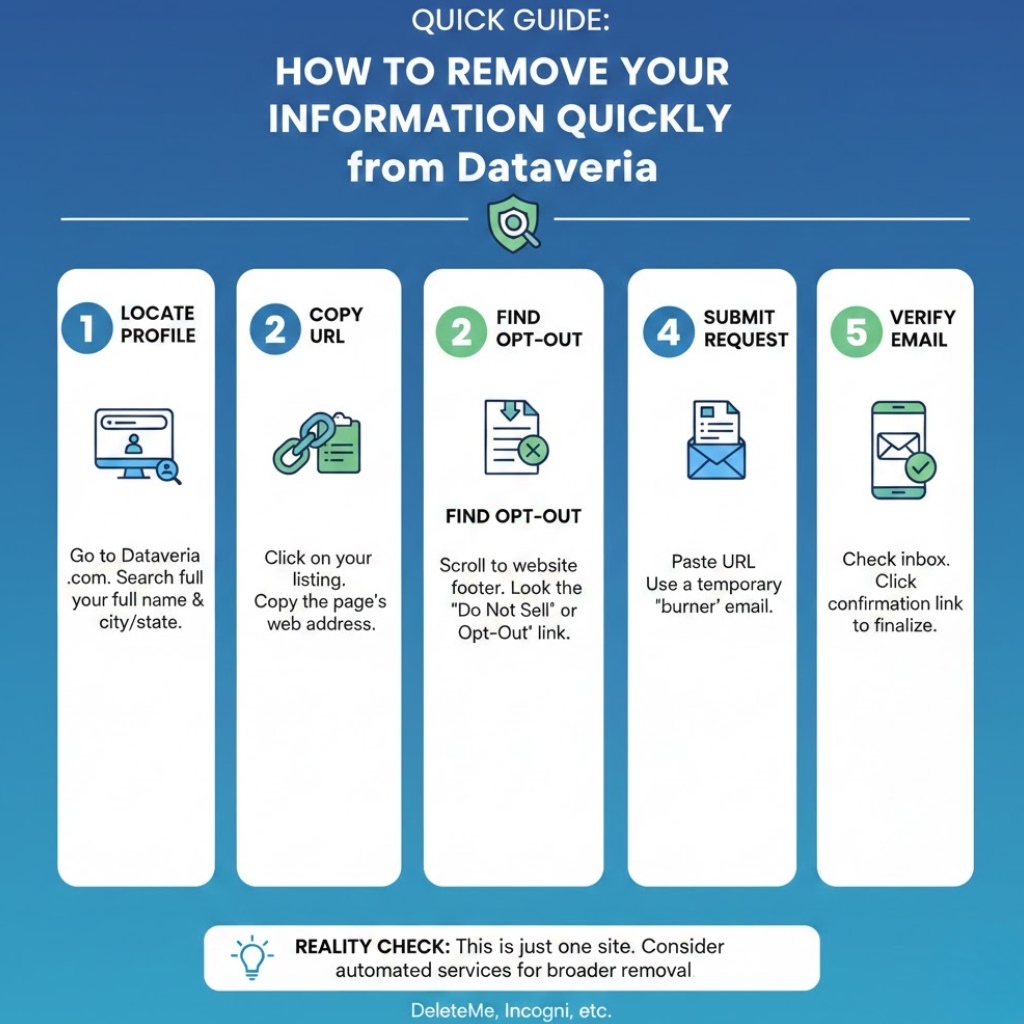
In today’s digital world, personal information can spread across countless online platforms without your consent. Dataveria, a popular people search data broker, collects and publishes publicly available records, creating profiles that include contact information, addresses, and other personal details. If you’re concerned about privacy, it’s essential to understand Dataveria how to remove your information and protect yourself from unwanted exposure. This guide will walk you through the process step by step, explain your rights, and provide strategies to maintain long-term privacy.
What Is Dataveria and why does it matter
Dataveria is a data broker that aggregates personal information from public records, social media, and other online sources. The platform creates detailed profiles that can include phone numbers, email addresses, past residences, and other identifiers.
Why it matters:
- Leaving your information on Dataveria can increase your risk of identity theft, spam calls, and phishing attacks.
- Many people are unaware that their data appears on such platforms without their consent.
- Understanding Dataveria how to remove your information is a crucial step toward digital privacy.
Your Legal Rights Before You Opt-Out
Before starting the removal process, it’s important to know your privacy rights. Laws like the California Consumer Privacy Act (CCPA) and the Oregon Consumer Privacy Act give individuals the right to request deletion of personal data from data brokers.
Key points:
- CCPA: Residents of California can request the deletion of personal information collected by data brokers.
- Oregon Law: Similar rights exist for Oregon residents, allowing them to control their personal data.
- “Do Not Sell My Info”: Dataveria provides an opt-out mechanism under these privacy frameworks.
Being familiar with these rights ensures your request is valid and legally supported.
Step-by-Step Guide to Removing Your Information from Dataveria
Here’s a structured approach to successfully remove your personal data.
1. Locate Your Dataveria Profile
- Search for your name on Dataveria.
- Identify the profile that contains your personal information.
- Copy the profile URL for reference.
2. Prepare for the Opt-Out
- Gather relevant identifiers: full name, email, phone number, or address associated with the profile.
- Ensure your email account is accessible to confirm removal requests.
Also read: Where in the US is New England, and What States Does It Include
3. Submit the Opt-Out Form
- Visit Dataveria’s privacy or opt-out page.
- Fill out the form using the details from your profile.
- Paste the profile URL in the designated field.
- Agree to any legal statements confirming your identity and request.
4. Verify Your Identity
- Dataveria may send a verification email.
- Follow the instructions carefully to confirm your opt-out.
- Check your spam folder if the email doesn’t appear within a few minutes.
5. Monitor the Removal
- Removal can take several days to weeks.
- Search for your name periodically to ensure your profile is no longer visible.
- Keep records of submission dates and confirmation emails.
Why Data Reappears and How to Prevent It
Even after removal, personal data can reappear due to:
- Public records updates or new court filings.
- Third-party websites that reshare or scrape data.
- Residual backup copies are maintained by data brokers.
Prevention strategies:
- Schedule quarterly checks for your name on Dataveria and other brokers.
- Maintain minimal public exposure: limit social media information, remove outdated accounts, and avoid sharing sensitive data online.
- Use privacy services or tools for ongoing monitoring.
Removing Information from Other Data Brokers
Dataveria is just one of many platforms that aggregate personal data. For complete privacy, consider a broader approach.
Manual opt-out checklist:
| Confirm via the link in the email | Opt-Out Method | Notes |
|---|---|---|
| Whitepages | Online form | Requires email verification |
| Spokeo | Opt-out form & email | Can take 10–15 days |
| PeopleFinder | Online request + verification | Manual submission |
| Intelius | Opt-out email or web form | Confirm via link in email |
| BeenVerified | Online opt-out form | Check multiple profiles |
Automated removal tools: Incogni, Optery, and EraseMe can help streamline the process but may involve subscriptions.
Advanced Privacy Hygiene
After removing your data from Dataveria and other brokers, ongoing protection is key.
Minimize Future Exposure
- Use aliases or secondary email addresses for non-essential online registrations.
- Avoid posting sensitive personal information on public forums.
- Limit sharing of phone numbers and addresses online.
Identity Protection Strategies
- Enable multi-factor authentication for your online accounts.
- Regularly monitor credit reports and identity alerts.
- Consider identity theft protection services for additional coverage.
FAQS: Dataveria How to Remove Your Information
How long does it take for Dataveria to remove my information?
Typically, it takes a few days to several weeks, depending on verification processes and data refresh cycles.
Can Dataveria re-publish my info after removal?
Yes, if your data is publicly available elsewhere, it may reappear. Monitoring and repeated opt-out requests are recommended.
Do automated removal services work for Dataveria?
They can help, but manual verification steps are often required.
What if I don’t verify my email?
Your removal request will not be processed until verification is completed.
Conclusion: Key Takeaways
Removing your personal information from Dataveria is a multi-step process that requires diligence, legal knowledge, and monitoring. By understanding Dataveria how to remove your information, leveraging your legal rights, and implementing ongoing privacy strategies, you can significantly reduce your exposure online.
Actionable steps:
- Identify your Dataveria profile and gather your information.
- Submit a verified opt-out request.
- Monitor for reappearances and remove data from other brokers.
- Practice ongoing privacy hygiene and consider automated tools.
